Motion Capture
Motion capture software
Motion capture software
Discover sophisticated motion capture software that allows you to create realistic character movement quickly and easily.
 Image courtesy of Superalloy Interactive
What is motion capture?
What is motion capture?
Motion capture, or mocap, is the process of recording an actor’s physical movements and translating them onto digital character models. When paired with 3D animation software, mocap allows actors to bring realistic motion to CGI characters—whether human, animal, or entirely fantastical—giving them lifelike presence on screen.
Motion capture, or mocap, is the process of recording an actor’s physical movements and translating them onto digital character models. When paired with 3D animation software, mocap allows actors to bring realistic motion to CGI characters—whether human, animal, or entirely fantastical—giving them lifelike presence on screen.
How motion capture is used
Motion capture software is widely used in the film, television, game development, and virtual reality industries. It helps animators, VFX artists, professional creators, and game developers create realistic animations and enhance visual storytelling with precise character movements.
Motion capture software is widely used in the film, television, game development, and virtual reality industries. It helps animators, VFX artists, professional creators, and game developers create realistic animations and enhance visual storytelling with precise character movements.

Video games
Video games
By recording human actions and using them to animate digital models, 3D artists utilize motion capture software and techniques to bring deep realism to video game characters .
By recording human actions and using them to animate digital models, 3D artists utilize motion capture software and techniques to bring deep realism to video game characters .

Film & TV
Film & TV
Performance motion capture technology allows artists to translate an actor’s movements and facial expressions directly onto digital character models, creating lifelike animated performances.
Performance motion capture technology allows artists to translate an actor’s movements and facial expressions directly onto digital character models, creating lifelike animated performances.

Previsualization
Previsualization
Motion capture is integral to previsualization, the mapping or pre-planning of scenes before principal photography.
Motion capture is integral to previsualization, the mapping or pre-planning of scenes before principal photography.
Autodesk's motion capture software
Direct characters like you would in a mocap studio, but virtually, inside Maya
MotionMaker is a generative animation system for character animation, available in Maya. MotionMaker helps you generate motion faster, while still giving you control to edit animation to make it your own.
MotionMaker is a generative animation system for character animation, available in Maya. MotionMaker helps you generate motion faster, while still giving you control to edit animation to make it your own.

Maya's new AI-powered tool
Maya's new AI-powered tool
Animating every element of a scene or performance can be time-consuming, but with Maya’s AI-powered MotionMakertool, you don’t have to. Simply capture the important keyframes of the performance, and MotionMaker will do the rest. It takes motion data from Maya and passes it through its machine learning model to predict the next character pose frame by frame. You can even edit movement as if you were directing a human mocap performer in a studio.
Animating every element of a scene or performance can be time-consuming, but with Maya’s AI-powered MotionMakertool, you don’t have to. Simply capture the important keyframes of the performance, and MotionMaker will do the rest. It takes motion data from Maya and passes it through its machine learning model to predict the next character pose frame by frame. You can even edit movement as if you were directing a human mocap performer in a studio.

Directable AI-powered animation
Directable AI-powered animation
Autodesk's Lance Thornton, Principal Product Manager, and Etienne Allard, Sr. Software Developer, demonstrate MotionMaker at SIGGRAPH 2025. MotionMaker enables generative motion from simple path and action inputs, reducing production time significantly. It uses trained models for bipeds and quadrupeds, supports retargeting to custom characters, and allows non-destructive edits. It also offers features like motion scaling, path modes, and foot sliding reduction.
Autodesk's Lance Thornton, Principal Product Manager, and Etienne Allard, Sr. Software Developer, demonstrate MotionMaker at SIGGRAPH 2025. MotionMaker enables generative motion from simple path and action inputs, reducing production time significantly. It uses trained models for bipeds and quadrupeds, supports retargeting to custom characters, and allows non-destructive edits. It also offers features like motion scaling, path modes, and foot sliding reduction.

MotionMaker at Autodesk University
MotionMaker at Autodesk University
At Autodesk University, CEO Andrew Anagnost unveils new AI tools in Maya designed to accelerate animation workflows, including MotionMaker, which combines keyframing, mocap, and machine learning to quickly generate motion; FaceAnimator, which creates facial and lip-sync animation from audio using existing rigs and styles; and Autodesk Assistant, a natural language tool that automates creative tasks.
At Autodesk University, CEO Andrew Anagnost unveils new AI tools in Maya designed to accelerate animation workflows, including MotionMaker, which combines keyframing, mocap, and machine learning to quickly generate motion; FaceAnimator, which creates facial and lip-sync animation from audio using existing rigs and styles; and Autodesk Assistant, a natural language tool that automates creative tasks.
What equipment is used in motion capture?
For successful motion capture, there are several key ingredients (unless you’re using Flow Studio, our AI-powered mocap solution, which requires no equipment).
For successful motion capture, there are several key ingredients (unless you’re using Flow Studio, our AI-powered mocap solution, which requires no equipment).

The suit
The suit
When actors are filmed for motion capture, they wear special suits with reflective markers, which allow their movement and body parts to be captured digitally.
When actors are filmed for motion capture, they wear special suits with reflective markers, which allow their movement and body parts to be captured digitally.

Cameras
Cameras
Cameras are a vital part of any motion capture system. These need to be highly precise so that they can accurately capture the motion.
Cameras are a vital part of any motion capture system. These need to be highly precise so that they can accurately capture the motion.

Motion capture software
Motion capture software
Once you've captured a performance using mocap, you can transform it using 3D motion capture software such as MotionBuilder or Maya.
Once you've captured a performance using mocap, you can transform it using 3D motion capture software such as MotionBuilder or Maya.
 Image courtesy of Superalloy Interactive
Motion capture starts with the right capture space
Motion capture starts with the right capture space
Motion capture can't be done just anywhere - you need a capture space or stage that is kitted out for the process. A large space is ideal, with plenty of room for movement. Your mocap space also needs to have good lighting conditions to ensure optimal capture. With some motion capture systems, such as those using inertial motion capture, independent creators can even create a suitable space in their own home.
Motion capture can't be done just anywhere - you need a capture space or stage that is kitted out for the process. A large space is ideal, with plenty of room for movement. Your mocap space also needs to have good lighting conditions to ensure optimal capture. With some motion capture systems, such as those using inertial motion capture, independent creators can even create a suitable space in their own home.
See how creatives use our motion capture software

Using AI motion capture in 'Superman & Lois'
Using AI motion capture in 'Superman & Lois'
Find out how VFX house, Boxel Studio, used Flow Studio to pre-visualize key action sequences and deliver 'Superman & Lois' on time and on budget.
Find out how VFX house, Boxel Studio, used Flow Studio to pre-visualize key action sequences and deliver 'Superman & Lois' on time and on budget.

Enhancing VFX for YouTube with Flow Studio
Enhancing VFX for YouTube with Flow Studio
Discover how award-winning content creators, Corridor Digital, use Flow Studio’s innovative AI-powered mocap tools to streamline and accelerate their VFX pipeline.
Discover how award-winning content creators, Corridor Digital, use Flow Studio’s innovative AI-powered mocap tools to streamline and accelerate their VFX pipeline.
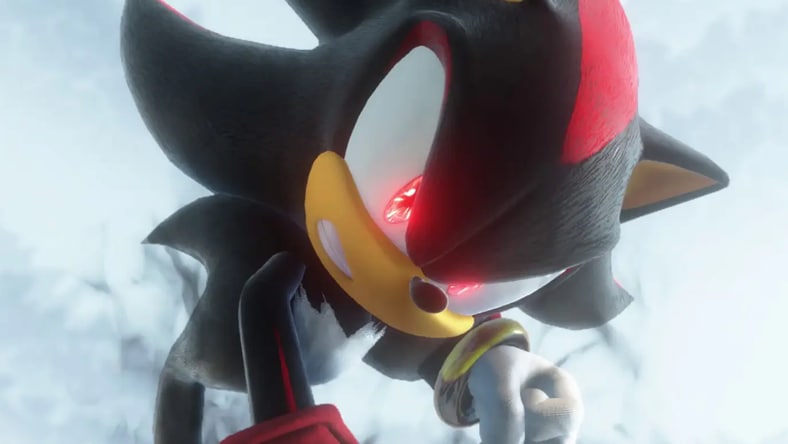
SEGA's mesmerizing character movements
SEGA's mesmerizing character movements
The developers at SEGA explain how they used Maya and MotionBuilder for motion creation in the 'Sonic X Shadow Generations' video game.
The developers at SEGA explain how they used Maya and MotionBuilder for motion creation in the 'Sonic X Shadow Generations' video game.
Frequently asked questions (FAQs) on motion capture
An actor wearing a mocap suit fitted with markers performs the desired role in front of specialized cameras, which capture their movements and translate them into actionable data. Motion capture software is then used to build a digital 'skeleton' that corresponds to the actor. A 3D character can then be placed on top of this skeleton to create life-like effects. Today, markerless AI motion capture solutions like Flow Studio can record and interpret motion capture data without needing motion capture suits, markers, or sensor hardware required for traditional motion capture.
A lot depends on the quality of the data you record. If you want top results, then be sure to use properly calibrated high-end cameras in good lighting. Alternatively, leverage the power of AI motion capture with Flow Studioto produce high-end results without special equipment.
Yes. Autodesk's Maya and 3ds Max support integration with motion capture source material. You can also use our Flow Production Tracking software to follow every aspect of the 3D motion capture and animation pipeline.
Motion capture animation is essentially the process by which the movements of a live performance are recorded and then turned into a 2D or 3D animation digitally. The entire body may be captured, or just certain parts such as hands or faces. The mocap movement data captured can then be mapped onto a digital model, which will then emulate the actor's motion capture performance. Motion capture animation is used widely in filmmaking and video game design.
While you can buy fully made motion capture suits, with a bit of time, money, and know-how, it's also possible to make your own. There are different ways of creating a mocap suit, but the basic principle is that to record movements, you need to create a way for your performer's outputs (movements) to be input into a computer. You can do this by wearing a mocap suit with reflective markers, or a mocap with inertial sensors. With Autodesk’s Flow Studio mocap software, meanwhile, you can create motion capture animations without any special equipment.
A motion capture system refers to the whole configuration used in the motion capture process. This generally includes specialist cameras, markers, and/or inertial sensors which are capable of recording movements. It also includes the mocap software that is used to take that raw movement data and turn it into something else digitally, such as a 3D character animation for a video game. Motion capture systems can be either optical (using cameras) or inertial (using inertia sensors).